Assessment for BioOne Complete by St. Clair - Module 2: Interface Navigation

Submitted by kdaigneau@stcl… on
Are user input fields accompanied by clear instructions on what the user needs to do to successfully complete the form?
Answer: Sometimes
Score: 1
Notes: Several user input fields rely on implied instructions.
Do user input fields contain labels in addition to overall instructions mentioned above?
Answer: Sometimes
Score: 1
Notes: While placeholder text is present for most fields and some inputs include descriptive labels (such as Username or Password), not all fields have labels linked to them. This caused WAVE to flag multiple missing label errors.
Are descriptions for fields and boxes easy to understand?
Answer: Sometimes
Score: 1
Notes: Descriptions for fields and boxes that are provided are consistently clear and easy to understand. Though, there are missing labels as identified by the Wave tool.
Are labels placed above the user input fields and clearly associated with each field?
Answer: Always
Score: 2
Notes: It is a mix. Some labels appear beside the input field while some have it above.
Are text cues for coloured form control labels available?
Answer: Sometimes
Score: 1
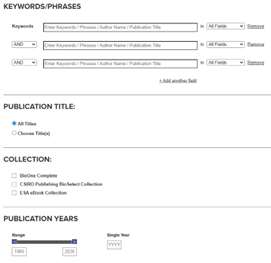
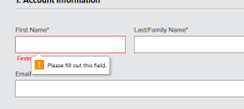
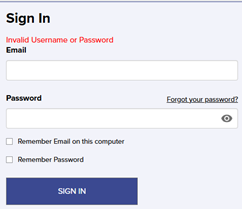
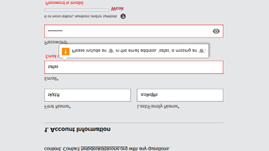
Notes: In some instances, a red-colored text cue appears above the input field when the user has not completed the form correctly such as for the Sign-In screen. However, for the Create An Account form, a pop-up appears informing the user they need to fill in the correct information. Though, the Advance Search form just fills out automatically even if the user does not enter any information.
Are other visual indicators provided consistently, such as an asterisk for required form fields?
Answer: Always
Score: 2
Notes: An asterisk symbol appears as the visual indicator for the forms field that require filling out.
Are user input fields either reversible, checked, or confirmed? One of the three is acceptable.
Answer: Sometimes
Score: 1
Notes: If a user enters an incorrect phrase or leaves the search field empty, results will still be displayed. However, entering incorrect login information triggers an error message, allowing the user to try again.
Are alert messages clearly visible to the user, either at the top of the form field, inline, or through a dialog box?
Answer: Always
Score: 2
Notes: Users will receive an alert message at the top of the sign-in form if incorrect information is entered, followed by an error message below stating "Email is invalid."
Do alert messages clearly indicate the field in which the error has occurred and a description of the error and the fix?
Answer: Always
Score: 2
Notes:
Is the user able to easily access the user input field to correct the error?
Answer: Always
Score: 2
Notes:
Is the user able to resubmit the form and re-validate their submission?
Answer: Always
Score: 2
Notes:
Do error reports follow a logical reading and navigation order?
Answer: Always
Score: 2
Notes:
When a user spells a word incorrectly, does the search function offer spelling suggestions or synonyms?
Answer: Sometimes
Score: 1
Notes: When entering misspelled words in the search field, suggestions come up in a drop-down menu. However, there is no suggested correct spelling offered.
Are icons such as to save, download, or print consistent across the site?
Answer: Always
Score: 2
Notes: There are only a few icons identified. These icons are consistent across the site.
Is alternative text clear and consistent for each icon type?
Answer: Always
Score: 2
Notes:
Are actions consistently labelled across the site? For example, the “search” button is always labeled “search”.
Answer: Always
Score: 2
Notes: Yes actions are labelled consistently across the site. The search button for example is located in the header on all pages.
Are icons that have adjacent links consistent?
Answer: Always
Score: 2
Notes:
Can the purpose of each link be determined from the link text alone?
Answer: Always
Score: 2
Notes: Yes. The purpose of the link can be determined by the text.
Does the eresource have a consistent layout and navigation across all pages?
Answer: Always
Score: 2
Notes: The layout and navigation is consistent throughout the database. The same information and links appears in the header and footer on all pages, etc.
Are search fields located in the same places throughout the website?
Answer: Always
Score: 2
Notes: The search field is located in the header.
Do other features occur in the same place throughout the website?
Answer: Always
Score: 2
Notes: Home, About, Subscribe, Publisher Resource, Library Resource, Help, & Contact links all appear in the footer, as well as the Copyright date. The Header contains BioOne logo Browse and Resource drop-down menus and the Search bar.
Does the electronic resource avoid the use of pop-up windows which open automatically in a new tab if a user clicks on a button?
Answer: Always
Score: 2
Notes:
Does the database avoid launching pop-up windows automatically when the database is loaded?
Answer: Always
Score: 2
Notes:
Where pop-ups occur, are users able to postpone or suppress any pop-ups?
Answer: Not Applicable
Score: -1
Notes: No pop-ups appear.
Does the database avoid launching pages in a new browser window with the usual browser controls missing?
Answer: Always
Score: 2
Notes:
Is page content subdivided hierarchically into appropriate headings and tagged appropriately?
Answer: Always
Score: 2
Notes: All headings are tagged appropriately and no errors appear.
Are headings concise and clear, and accurately reflect the content under that heading?
Answer: Always
Score: 2
Notes:
Do database page menus have a reasonable number of navigation items and drop-down options?
Answer: Always
Score: 2
Notes: There are two navigation drop-down menu options. Browse contains 7 items and Resource contains 5 items.
Does the main navigation and drop-downs contain a reasonable number of menu items?
Answer: Always
Score: 2
Notes:
Can all menus and submenus be accessed with screen readers and via keyboard navigation?
Answer: Always
Score: 2
Notes: All menus and submenus are accessible with screen reader and keyboard navigation.
Does the “results” page or item record view avoid opening in a new tab without a warning?
Answer: Always
Score: 2
Notes:
Is there an "update now" button that requests a refresh of content rather than automatically updating the content?
Answer: Always
Score: 2
Notes: While there is no explicit “Update now” button, content updates occur only when users change filter options such as checkboxes or date selections. Content does not update automatically.
Does the database avoid automatic redirection?
Answer: Always
Score: 2
Notes:
Does the form refrain from submitting automatically when a component receives focus?
Answer: Always
Score: 2
Notes:
Does the database avoid launching new windows when a component receives focus?
Answer: Always
Score: 2
Notes:
Does the database avoid change of focus when a component receives focus?
Answer: Always
Score: 2
Notes:
Are you able to tab through a page using keyboard navigation without the keyboard focus moving away from the control?
Answer: Always
Score: 2
Notes:

eResource: BioOne Complete
eResource Type: Database
Vendor: Other
Institution: St. Clair
Score: A

Key Findings

Strengths

  • The platform’s layout and navigation is consistent across all pages
  • Page content has appropriate headers and is tagged appropriately

Weaknesses

  • Some user input fields contain labels and clear instructions to help users successfully complete the form

Labels and Instructions for Interactive Elements

Question Answer Notes Images
Are user input fields accompanied by clear instructions on what the user needs to do to successfully complete the form? Sometimes Several user input fields rely on implied instructions.
Do user input fields contain labels in addition to overall instructions mentioned above? Sometimes While placeholder text is present for most fields and some inputs include descriptive labels (such as Username or Password), not all fields have labels linked to them. This caused WAVE to flag multiple missing label errors.
Are descriptions for fields and boxes easy to understand? Sometimes Descriptions for fields and boxes that are provided are consistently clear and easy to understand. Though, there are missing labels as identified by the Wave tool.
Are labels placed above the user input fields and clearly associated with each field? Always It is a mix. Some labels appear beside the input field while some have it above.
Are text cues for coloured form control labels available? Sometimes In some instances, a red-colored text cue appears above the input field when the user has not completed the form correctly such as for the Sign-In screen. However, for the Create An Account form, a pop-up appears informing the user they need to fill in the correct information. Though, the Advance Search form just fills out automatically even if the user does not enter any information.
Are other visual indicators provided consistently, such as an asterisk for required form fields? Always An asterisk symbol appears as the visual indicator for the forms field that require filling out.

Error Prevention

Question Answer Notes Images
Are user input fields either reversible, checked, or confirmed? One of the three is acceptable. Sometimes If a user enters an incorrect phrase or leaves the search field empty, results will still be displayed. However, entering incorrect login information triggers an error message, allowing the user to try again.

Error Reports

Question Answer Notes Images
Are alert messages clearly visible to the user, either at the top of the form field, inline, or through a dialog box? Always Users will receive an alert message at the top of the sign-in form if incorrect information is entered, followed by an error message below stating "Email is invalid."
Do alert messages clearly indicate the field in which the error has occurred and a description of the error and the fix? Always
Is the user able to easily access the user input field to correct the error? Always
Is the user able to resubmit the form and re-validate their submission? Always
Do error reports follow a logical reading and navigation order? Always

Search function spell-check

Question Answer Notes Images
When a user spells a word incorrectly, does the search function offer spelling suggestions or synonyms? Sometimes When entering misspelled words in the search field, suggestions come up in a drop-down menu. However, there is no suggested correct spelling offered.

Functionality of Interactive Elements

Question Answer Notes Images
Are icons such as to save, download, or print consistent across the site? Always There are only a few icons identified. These icons are consistent across the site.
Is alternative text clear and consistent for each icon type? Always
Are actions consistently labelled across the site? For example, the “search” button is always labeled “search”. Always Yes actions are labelled consistently across the site. The search button for example is located in the header on all pages.
Are icons that have adjacent links consistent? Always
Can the purpose of each link be determined from the link text alone? Always Yes. The purpose of the link can be determined by the text.

Consistent Navigation

Question Answer Notes Images
Does the eresource have a consistent layout and navigation across all pages? Always The layout and navigation is consistent throughout the database. The same information and links appears in the header and footer on all pages, etc.
Are search fields located in the same places throughout the website? Always The search field is located in the header.
Do other features occur in the same place throughout the website? Always Home, About, Subscribe, Publisher Resource, Library Resource, Help, & Contact links all appear in the footer, as well as the Copyright date. The Header contains BioOne logo Browse and Resource drop-down menus and the Search bar.
Are links, buttons, images, and other components that are used repeatedly throughout a website labeled consistently? Always

Pop-up windows/Interruptions

Question Answer Notes Images
Does the electronic resource avoid the use of pop-up windows which open automatically in a new tab if a user clicks on a button? Always
Does the database avoid launching pop-up windows automatically when the database is loaded? Always
Where pop-ups occur, are users able to postpone or suppress any pop-ups? Not Applicable No pop-ups appear.
Does the database avoid launching pages in a new browser window with the usual browser controls missing? Always

Headers

Question Answer Notes Images
Is page content subdivided hierarchically into appropriate headings and tagged appropriately? Always All headings are tagged appropriately and no errors appear.
Are headings concise and clear, and accurately reflect the content under that heading? Always

Menus

Question Answer Notes Images
Do database page menus have a reasonable number of navigation items and drop-down options? Always There are two navigation drop-down menu options. Browse contains 7 items and Resource contains 5 items.
Does the main navigation and drop-downs contain a reasonable number of menu items? Always
Can all menus and submenus be accessed with screen readers and via keyboard navigation? Always All menus and submenus are accessible with screen reader and keyboard navigation.

Change of context

Question Answer Notes Images
Does the “results” page or item record view avoid opening in a new tab without a warning? Always
Is there an "update now" button that requests a refresh of content rather than automatically updating the content? Always While there is no explicit “Update now” button, content updates occur only when users change filter options such as checkboxes or date selections. Content does not update automatically.
Does the database avoid automatic redirection? Always

Change of Context: Focus

Question Answer Notes Images
Does the form refrain from submitting automatically when a component receives focus? Always
Does the database avoid launching new windows when a component receives focus? Always
Does the database avoid change of focus when a component receives focus? Always
Are you able to tab through a page using keyboard navigation without the keyboard focus moving away from the control? Always
Previous1234Next