Are descriptions for fields and boxes easy to understand?
Answer: Sometimes
Score: 1
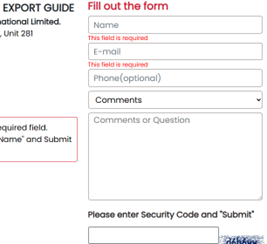
Notes: Descriptions for fields and boxes that are provided are consistently clear and easy to understand. Though, there are missing labels as identified by the Wave tool.
Are labels placed above the user input fields and clearly associated with each field?
Answer: Sometimes
Score: 1
Notes: Not too many labels are present. But for those that are, they appear beside or above the input field.
Are text cues for coloured form control labels available?
Answer: Always
Score: 2
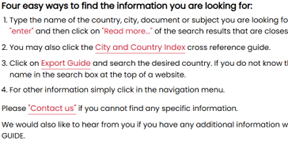
Notes: The user cannot proceed with the form unless all required fields are completed correctly. Additionally, a warning appears if an invalid Name or Email for contact form. However, there is no cue for the search field. Also, some of the text is red for instructions on how to search and use the Export Guide.
Are other visual indicators provided consistently, such as an asterisk for required form fields?
Answer: Never
Score: 0
Notes: No asterisk or any other visual indicator was is present for required field forms.
Are alert messages clearly visible to the user, either at the top of the form field, inline, or through a dialog box?
Answer: Not Applicable
Score: -1
Notes: Not able to test without logging out of the resource. There is no option to create an additional account in addition to the institutional login.
Do alert messages clearly indicate the field in which the error has occurred and a description of the error and the fix?
Answer: Sometimes
Score: 1
Notes: Not able to test without logging out of the resource. There is no option to create an additional account in addition to the institutional login. But for the contact form, there is a description of what fields need to be properly filled out.
Is the user able to easily access the user input field to correct the error?
Answer: Sometimes
Score: 1
Notes: For the form that was tested, users were able to easily access the input field to correct errors. However, this behaviour could not be confirmed for the Create Account or Sign In forms.
Is the user able to resubmit the form and re-validate their submission?
Answer: Sometimes
Score: 1
Notes: If user tries to submit a question or comment in the contact us form, if they forget to fill in any required fields, the form will not send. There is also a field for user to look at an image and submit a security form. The only not required field in this form is the Question/Comment box. Though, could not test out any sign-in or create an account forms.
Do error reports follow a logical reading and navigation order?
Answer: Always
Score: 2
Notes:
When a user spells a word incorrectly, does the search function offer spelling suggestions or synonyms?
Answer: Never
Score: 0
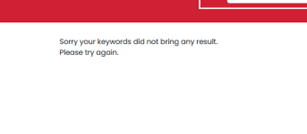
Notes: When entering a misspelled word in the search field, no suggestions for correct spelling or synonyms appear. However, no results will appear on the next screen.
Are icons such as to save, download, or print consistent across the site?
Answer: Not Applicable
Score: -1
Notes: No icons identified.
Is alternative text clear and consistent for each icon type?
Answer: Never
Score: 0
Notes: No icons identified.
Are actions consistently labelled across the site? For example, the “search” button is always labeled “search”.
Answer: Always
Score: 2
Notes: Yes actions are labelled consistently across the site. The search button for example is located in the header on all pages
Are icons that have adjacent links consistent?
Answer: Not Applicable
Score: -1
Notes: No icons
Can the purpose of each link be determined from the link text alone?
Answer: Always
Score: 2
Notes: Yes. The purpose of the link can be determined by the text.
Does the eresource have a consistent layout and navigation across all pages?
Answer: Always
Score: 2
Notes: The layout and navigation is consistent throughout the database. The same information and links appears in the header and footer on all pages, etc.
Are search fields located in the same places throughout the website?
Answer: Always
Score: 2
Notes: The search field is located in the header.
Do other features occur in the same place throughout the website?
Answer: Always
Score: 2
Notes: Migra Logo, Main Menu List with Home, Subscribe Now, Login, and Contact Us links; Resource List with Sample Export Guide, Reviews, Pricing, FAQ, and Terms links; Contact Information and copyright details all appear in the footer of the database. All of the items in the Header also remain in the same place throughout the database such as the search bar and navigation links.
Does the electronic resource avoid the use of pop-up windows which open automatically in a new tab if a user clicks on a button?
Answer: Always
Score: 2
Notes:
Does the database avoid launching pop-up windows automatically when the database is loaded?
Answer: Always
Score: 2
Notes:
Where pop-ups occur, are users able to postpone or suppress any pop-ups?
Answer: Not Applicable
Score: -1
Notes: No pop-ups appear.
Does the database avoid launching pages in a new browser window with the usual browser controls missing?
Answer: Always
Score: 2
Notes:
Is page content subdivided hierarchically into appropriate headings and tagged appropriately?
Answer: Always
Score: 2
Notes: All headings are tagged appropriately and no errors appear.
Are headings concise and clear, and accurately reflect the content under that heading?
Answer: Always
Score: 2
Notes:
Does the main navigation and drop-downs contain a reasonable number of menu items?
Answer: Always
Score: 2
Notes:
Can all menus and submenus be accessed with screen readers and via keyboard navigation?
Answer: Always
Score: 2
Notes: All menus and submenus are accessible with screen reader and keyboard navigation.
Does the “results” page or item record view avoid opening in a new tab without a warning?
Answer: Always
Score: 2
Notes:
Is there an "update now" button that requests a refresh of content rather than automatically updating the content?
Answer: Not Applicable
Score: -1
Notes: Migra search results load static pages and do not include filters or content updates, so this criterion is not applicable.
Does the database avoid automatic redirection?
Answer: Always
Score: 2
Notes:
Does the database avoid launching new windows when a component receives focus?
Answer: Always
Score: 2
Notes:
Does the database avoid change of focus when a component receives focus?
Answer: Always
Score: 2
Notes:
Are you able to tab through a page using keyboard navigation without the keyboard focus moving away from the control?
Answer: Always
Score: 2
Notes: